
Experiments in Unfair let you test one supplement or stack with a structured on-and-off protocol, track a daily check-in plus optional health measurements, and review whether the intervention looked worth keeping.
What experiments are for
Experiments are Unfair's way of helping you test something deliberately instead of guessing from memory.
In the shipped app, an experiment is built around one target:
- one supplement
- one stack
The goal is simple: compare how things look before and during the intervention, then decide whether it seems useful to keep in your routine.
What you can test
You can build an experiment around a supplement or a stack that the app can identify as the intervention.
In current app behavior, experiments are introduced as a way to pick what to test, check in daily, and then make a keep-or-drop decision at the end.
If you want to start from the main home screen, open the You tab overview and look for the `Experiments` card.
If you are browsing your catalog first, Unfair also exposes experiment-start actions from supported supplement and stack detail flows. For more on those library surfaces, see Supplement Search and Library.
Where to start an experiment
For most people, the clearest place to start is the You tab.
If you have not started an experiment before, the app can first show an introduction sheet with three steps:
- Pick what to test.
- Do daily check-ins.
- Review whether to keep it or drop it.
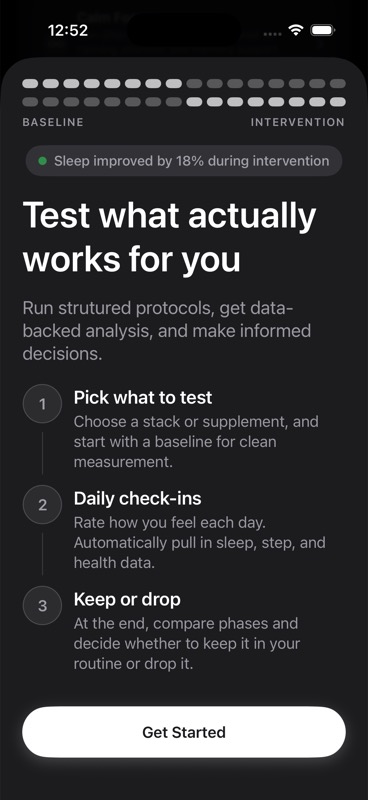
From there, `Get Started` takes you into the experiment flow.
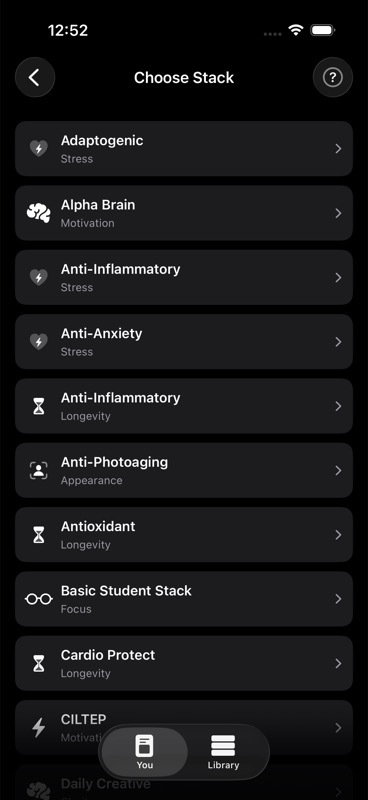
If nothing is currently running, the experiment builder starts a new experiment immediately.
If another experiment is already active, a newly created one is saved to your queue instead of starting right away.
The basic structure of an experiment
In the shipped builder, every experiment has the same core pieces:
- an experiment title
- an optional hypothesis
- a protocol design
- one or more measurements
- a daily check-in time
Protocol design
The builder lets you set:
- `Baseline days`
- `Intervention days`
- `Washout days`
The default visual structure is baseline first, intervention second, with optional washout after that.
In plain terms:
- `Baseline` is the comparison period before the intervention is taken.
- `Intervention` is the period when you take the supplement or stack on its scheduled times.
- `Washout` is an optional period after intervention when you stop again and observe what happens.
On the active experiment card in the app, Unfair labels the current phase as `Baseline`, `Intervention`, `Washout`, or `Complete` and shows what day of that phase you are on.
For the washout concept itself, see Washout Period.
What measurements mean
Measurements are the outcomes you choose to track during the experiment.
In the current builder, Unfair supports these options:
- `Daily rating (0-10)`
- `Sleep minutes`
- `Steps`
- `Active energy`
- `Weight`
`Daily rating (0-10)` is the main manual check-in measurement. It is on by default in the builder.
The other four are Apple Health-based measurements. They are optional, and they depend on your Apple Health connection and permissions.
If you want those health-based outcomes available and reliable, review Apple Health Integration and HealthKit Permissions.
What check-ins mean
A check-in is your daily self-rating for the experiment.
In shipped behavior, the builder asks you to set a `Daily check-in time`, and the active experiment stores that as the reminder time for the experiment's daily rating.
A check-in is not the same thing as logging a dose:
- a dose log records whether you took the intervention when scheduled
- a check-in records how the day felt on the experiment's rating scale
That distinction matters because Unfair tracks both kinds of behavior when evaluating an experiment.
In the app's experiment detail logic, check-in counts and dose-log counts are both used as part of the experiment's progress and consistency picture.
You can also see experiment check-ins later in Journal Timeline, where they appear as experiment events.
What the app does during an active experiment
When an experiment is active, the You tab changes from a generic experiments card to an `Active experiment` card.
That active card shows:
- the experiment title
- the current phase
- phase progress such as `Day X`
- instructions for what to do today
- a shortcut to the queue if more experiments are lined up next
Those daily instructions are phase-specific in shipped behavior:
- during `Baseline`, the app tells you not to take the experiment target that day
- during `Intervention`, the app tells you to take it and shows the scheduled times when they exist
- during `Washout`, the app tells you not to take it that day
- after the planned phases finish, the card shows the experiment as complete
If your experiment includes the daily rating outcome, the app can also schedule experiment-related reminders for check-in and later decision review.
What the app does for queued experiments
If you create a new experiment while another one is already active, Unfair adds the new one to your queue.
Queued experiments are not ignored in the background. In the shipped app, they are surfaced in two ways:
- the active experiment card can show how many are queued
- the queue screen can show the next experiment and an estimated start date
If there is no active experiment, the app can also show an `Up next` card for the next queued experiment.
The app estimates queued start timing by looking at the remaining planned days in the current run and then adding the planned duration of anything ahead in the queue.
When the current day reaches the estimated start day and no experiment is active, Unfair automatically starts the first queued experiment.
When decisions happen
In the shipped builder, experiments are configured to review a decision at the end of the intervention phase.
That does not guarantee an instant answer every time. The app's decision logic can still decide that more data is needed before making a decision.
In practical terms, the experiment flow is designed around a final question:
- keep it
- drop it
- continue running if you need more evidence
A good way to use experiments
Experiments work best when you keep the setup simple and stay consistent.
A practical pattern inside Unfair is:
- Pick one supplement or one stack to test.
- Keep the measurements focused.
- Do the daily check-in at the time you chose.
- Log intervention doses consistently during intervention days.
- Review the result only after the planned phases have had time to play out.
If you want the timeline view of what actually happened day by day, use Journal Timeline. If you want the privacy and sharing controls for experiment snapshots, use Experiment Data Sharing.