
The You tab is your home screen in Unfair. It brings together today’s recommendation, anything you are actively running, your saved and favorited items, experiment tools, and quick access to Journal and App Preferences.
What the You tab shows
The exact mix can change based on what you have already set up, but the You tab can include these sections:
- `Next Today`, a card for the most important action the app wants you to take now
- `Daily recommendation`, with a recommended stack and up to three recommended supplements
- A health tile, if health signals are enabled for your account preferences
- `Active Stack` or `Active Stacks`, when you have stacks currently running
- `Stack Builder`, plus a `Your Stacks` shortcut when you have saved custom stacks
- `Favorites`, when you have favorited stacks or supplements
- `Experiments`, including your active experiment, queued experiments, or finished experiment history
- Top bar shortcuts for `Journal` and `App Preferences`
If a section does not apply to you yet, it may stay hidden until there is something to show.
Next Today
When the app has a clear next step for today, the You tab can show a `Next Today` card at the top.
This card is action-focused. Depending on what is active in your account, it can prompt you to:
- log a stack dose
- log an experiment dose
- complete an experiment check-in
- review an experiment decision
- resume a paused experiment
The main button takes the recommended action immediately. If there are other actions waiting, they appear underneath as secondary items.
Daily recommendation
The `Daily recommendation` card is the main recommendation surface on this tab.
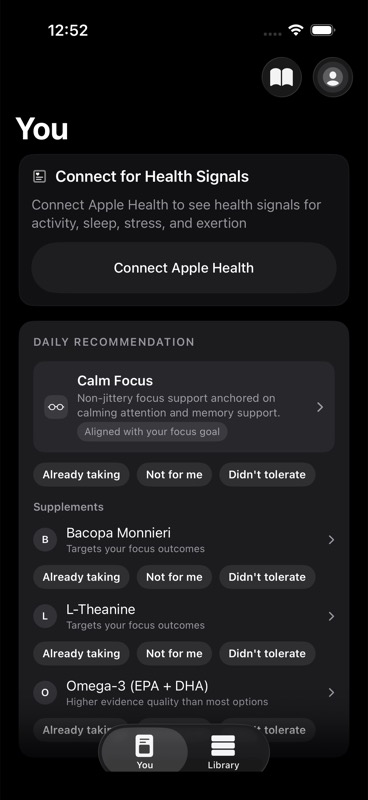
If Unfair has a top stack recommendation for you, the card shows:
- the stack name
- the stack description, when available
- a short rationale line
Below that, the card can also show up to three recommended supplements with short reason lines.
You can tap the stack or any supplement to open its detail screen. You can also rate each recommendation directly from the card using the feedback controls. That feedback is stored against the specific recommended item.

If recommendations are still loading, the card can briefly show a loading state instead of final content.
For a closer walkthrough of how to read this card, see Daily Recommendation Review.
Health tile
The You tab can also show a health tile near the top of the screen.
What you see there depends on your Apple Health connection state:
- If Apple Health is not connected, the tile can show a `Connect Apple Health` button.
- If some health permissions are still missing, the tile can show a `Connect missing Health data` button.
- If health data is available, the tile shows four signal areas: activity, sleep, recovery, and exertion.
Each health cell can switch between a `today` view and a trailing 7-day view when you tap it. If a metric is unavailable, the tile shows `No data yet` for that metric.
The tile appears based on your app preferences. It is not a full health dashboard on its own. On the You tab, it is a compact summary and connection prompt.
Active stacks
If you have one or more running stacks, the You tab shows an `Active Stack` or `Active Stacks` section.
Each active stack row shows:
- the stack name
- weekday circles for the current schedule cycle
- the planned reminder times for that stack
Tap a stack to open its detail screen.
This section is meant to answer two practical questions quickly: which stacks are active right now, and when they are scheduled.
Stack Builder and Your Stacks
The `Stack Builder` tile is always the main entry point for making a custom stack from supplements in your library.
From this tile, you can:
- open Stack Builder
- create a new custom stack
- return to your saved custom stacks
If you already have saved stacks, the tile also shows `Your Stacks` with a saved stack count. Opening that list lets you review your saved custom stacks and open each one individually.
If you want help with the planning side of stack setup, see Stack Planning.
Favorites
When you have favorited items, the You tab shows a `Favorites` section.
This list can include both:
- favorited stacks
- favorited supplements
Tap any favorite to open its detail screen.
Favorites are a quick-access list. They do not replace your library or your saved stacks. They simply keep the items you want to revisit most close at hand.
Experiments
The experiment area changes based on where you are in the process.
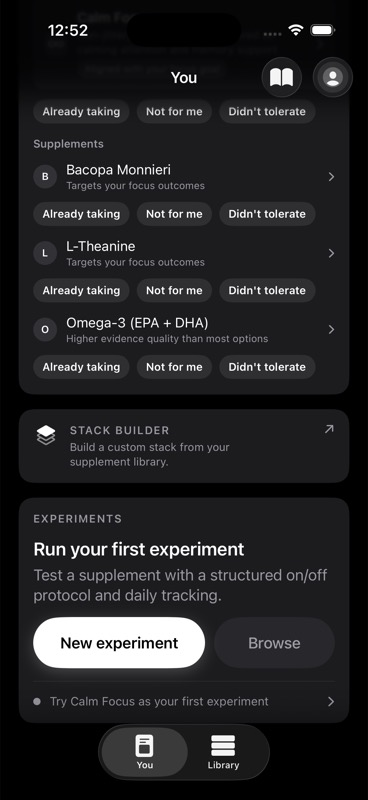
If you do not have an active experiment, the You tab shows an `Experiments` card with buttons for:
- `New experiment`
- `Browse`
The card can also suggest a first or next experiment based on available items.
If you do have an active experiment, the tab shows an `Active experiment` card instead. That card includes:
- the experiment title
- the current phase, such as baseline, intervention, washout, or complete
- instructions for what to do today
- a queue shortcut when more experiments are lined up next
If you have queued experiments but nothing currently running, the You tab shows an `Up next` card with the next queued experiment and, when available, an estimated start time.
If you have completed experiments, the tab can also show a `Finished experiments` shortcut to your experiment history.
Journal and App Preferences shortcuts
The top-right area of the You tab includes two shortcuts:
- `Journal`, shown with a book icon
- `App Preferences`, opened from your profile avatar button
`Journal` opens the Journal screen in a sheet.
`App Preferences` opens your settings sheet, where the app currently exposes onboarding and appearance preferences from this shortcut.
If you came here looking for the journal timeline itself, see Journal Timeline.