
Use the Library tab to find supplements and stacks, narrow results with filters, favorite what you want to revisit, and jump straight into logging or details without leaving search.
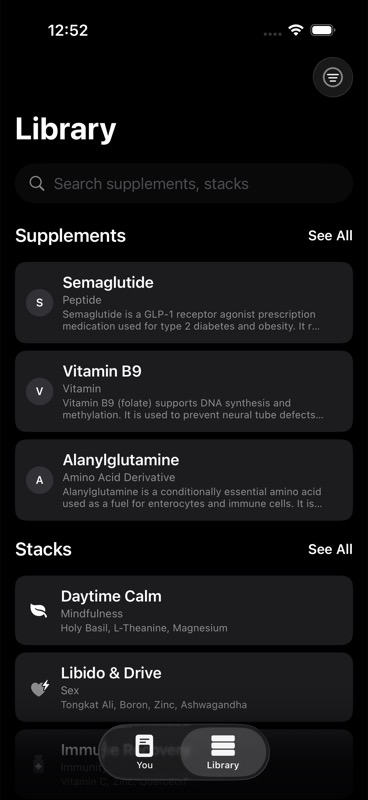
The main search field is labeled `Search supplements, stacks`. It searches both sections at the same time.
What search matches
Search is built to be forgiving. It matches against the text the app already has for each item, not just exact titles.
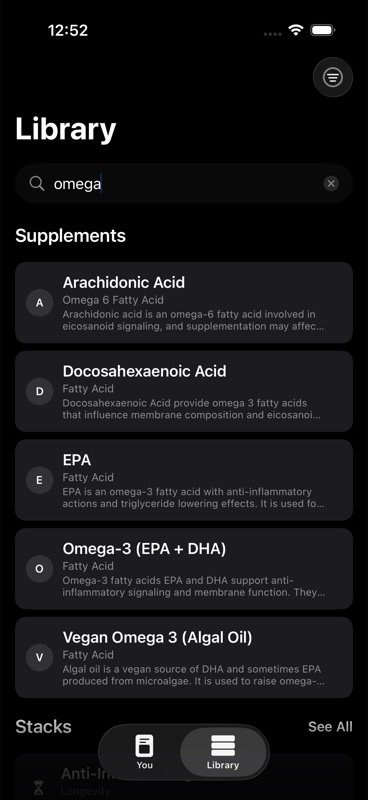
For supplements, search matches:
- supplement name
- alternative names and aliases
For stacks, search matches:
- stack name
- stack description
- supplement names inside the stack
- stack tags when tags exist
Search is case-insensitive, so you do not need exact capitalization. If you clear the query, the screen goes back to its default browse state.
What you see before you type
When you open Library with no search text and no filters selected:
- the app shows a short preview of supplements
- the app shows a short preview of stacks
- each section can show `See All` if there are more results available
By default, those previews are not meant to be the full catalog. They are a quick starting point. Tap `See All` to expand that section into the full filtered list.
If you start typing or choose a filter, the app switches from preview behavior to a larger result list automatically.
Supplement filters
Supplement filters live in the filter menu in the top-right corner of the Library screen.
The app always includes:
- `All Supplements`
- `Favorites`
- `WADA`
Depending on what is in the catalog, the app can also show:
- named supplement groups such as `Mitochondrial`
- supplement types such as vitamins, peptides, or other type labels already attached to supplements
How the supplement filters work
`Favorites` shows only supplements you have favorited.
`WADA` shows supplements the app marks as prohibited, conditional, or flagged for WADA monitoring based on the supplement's stored research metadata.
Type filters show supplements whose type matches that label exactly in the catalog.
If a filter is no longer relevant because the catalog changed, the app resets that filter back to `All Supplements`.
Stack filters
Stack filters use the same filter menu, but they apply only to the stack section.
The app always includes:
- `All Stacks`
- `Favorites`
The app also adds stack filters only when they are relevant to your current data:
- `Your Stacks` if you have saved your own stacks
- `Travel` if at least one stack is tagged travel
- `Peptides` if at least one stack is made entirely from peptide supplements
- category filters for built-in stacks that have a category
How the stack filters work
`Your Stacks` shows only the stacks you created or saved in your plan.
`Favorites` shows only favorited stacks.
`Travel` looks for stacks tagged `travel`.
`Peptides` is stricter than a keyword match. It shows only stacks whose supplements all resolve to peptide supplements.
Category filters match the stack's category label, not free-form text.
If you remove all of your custom stacks, `Your Stacks` disappears and the app resets that filter to `All Stacks`.
Favorites
You can favorite both supplements and stacks directly from search.
On a supplement row:
- swipe to add to favorites
- if it is already favorited, the row shows a filled heart and the swipe action changes to remove it from favorites
On a stack row:
- swipe to add or remove it from favorites
Favorites are then available as their own filter for both sections, so favoriting is the fastest way to keep a short working list inside Library.
Quick actions from supplement rows
Supplement rows support two immediate actions from search:
- favorite or unfavorite the supplement
- `Log Dose`
`Log Dose` records a dose directly from the search results. While a dose is being saved, the button changes to `Logging...`. After a successful save, it changes to `Logged`, and the screen shows a short success toast.
If you need more control than the quick action gives you, open the supplement instead. The supplement detail screen includes a manual entry action and the option to start an experiment from that supplement.
What happens when you open a result
Tapping a supplement result opens the supplement detail screen.
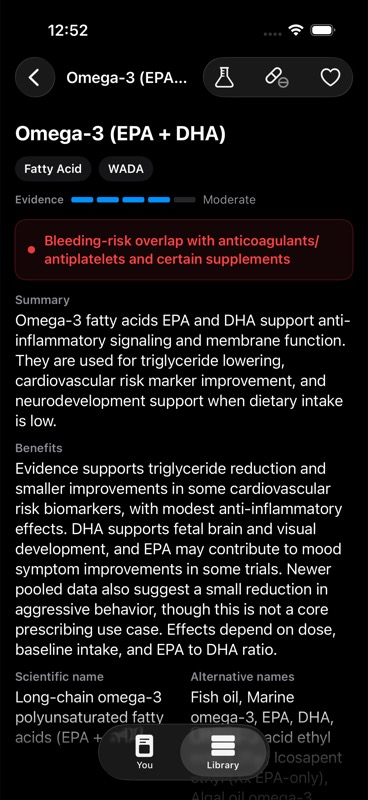
From there, you can:
- favorite or unfavorite it
- open manual dose entry
- start an experiment for that supplement
Tapping a stack result opens the stack detail screen.
From there, you can:
- favorite or unfavorite it
- start the stack
- edit options for an active stack
- stop an active stack
- start an experiment from that stack
If you start a stack from its detail screen, the app opens stack activation options first so you can choose the schedule and cycle settings before the stack starts. For the broader workflow around active stacks, see Stack Planning.
What appears inside results
Search results are designed to help you scan quickly before you drill in.
Supplement rows show:
- the supplement name
- its type label
- a short outcome snippet when the catalog has a summary or benefits line available
- a heart icon when it is favorited
Stack rows show:
- the stack name
- its category when available, otherwise its description
- the supplement names in that stack when the app can resolve them
- unresolved supplement names if that is the only supplement list available
This means a stack can still be searchable and readable even if some supplement names are stored as unresolved text instead of linked catalog items.
Empty states and clearing filters
If nothing matches, the app tells you directly:
- `No supplements match your search.`
- `No stacks match your search.`
If the filter icon is filled, at least one filter is active. Use `Clear Filters` in the filter menu to return both sections to their default all-items view.
For a broader overview of how the catalog is organized, see Supplement Library. If you are new to stack setup, Stack Planning is the next step.