
This content is for informational purposes only and is not a substitute for professional advice.
Stack planning in Unfair means choosing a stack you can actually follow, starting it with a realistic schedule, and then checking Journal to see whether the plan is working in real life instead of only sounding good on paper.
Where to start
You can reach stacks from a few places in the current app:
- the `Library` tab, where search shows both supplements and stacks
- the `You` tab, which includes your stack builder and active stacks
- a stack detail screen, where the stack's options menu can start or manage that stack
If you already know what you want, open it from Supplement Search and Library. If you need to build your own, use `Stack Builder` from the `You` tab and pick the supplements you want in the stack first.
How to choose a stack
Start with the smallest stack that still matches the job you want it to do.
In practice, that usually means choosing one stack that answers a clear question, such as:
- sleep support
- focus during work hours
- travel or jet lag support
- recovery or training support
A good first stack is narrow enough that you can tell whether you actually took it and whether it helped.
A weak first stack usually has one of these problems:
- too many supplements to remember
- dose times scattered across the whole day
- a schedule that does not match your real week
- no clear way to tell whether you followed it
If you are deciding between a complicated stack and a simpler one, choose the simpler one first. You can always expand later after you have evidence that the smaller version is easy to run.
How to start a stack
When you open a stack detail screen, the options menu can show `Start Stack`.
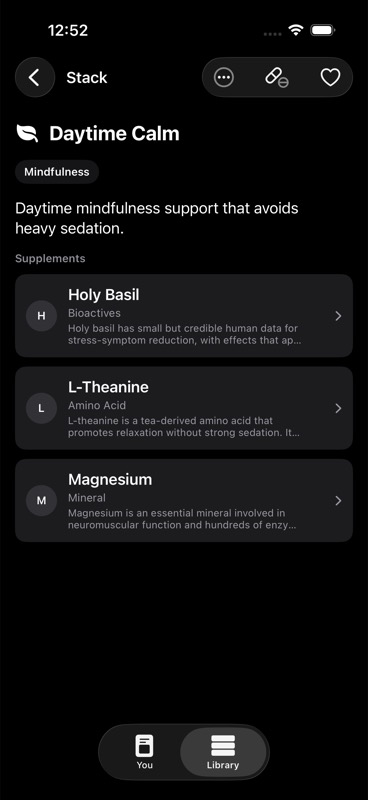
When you tap `Start Stack`, Unfair opens a setup sheet before activating it. That sheet lets you choose two things:
- `Schedule`: the times of day when the stack should run
- `Cycle`: the weekdays when the stack should be active
The current app offers four schedule slots:
- `Morning`
- `Midday`
- `Evening`
- `Bedtime`
You can turn on more than one slot, but do not add extra slots unless you expect to use them consistently.
For cycle setup, you choose the weekdays that should be on. Unfair saves those selected weekdays and uses the count to define the stack's on-days and off-days pattern. You must choose at least one weekday and at least one schedule slot before the stack can start.
How to keep the schedule realistic
Most stack plans fail because they ask for more precision than your life supports.
Use these rules:
- Start with the fewest daily moments possible.
- Prefer time blocks you already recognize, like morning and evening, over highly specific routines.
- Match weekdays to your actual pattern, not your ideal one.
- Avoid building a seven-day plan if you already know you only want the stack on workdays.
For many people, a strong starting plan is one or two daily slots across a limited set of weekdays.
That matters because Unfair uses your active stack schedule in multiple places. The stack plan is what the app uses to decide when a stack is active, what schedule to show on the `You` screen, and when Cycle-Aware Reminders can follow that plan.
How to edit cadence after a stack is active
Once a stack is active, you do not need to stop and recreate it just to change timing.
From an active stack, the options menu can show:
- `Edit Schedule`
- `Stop Stack`
`Edit Schedule` opens the same stack activation sheet again, prefilled with the stack's current weekdays and schedule slots. That lets you tighten the plan after a few days of use.
Use `Edit Schedule` when:
- you are missing the midday dose and want to remove it
- you only want the stack on certain weekdays
- morning is too early and evening is enough
- the plan looks good on paper but is annoying in practice
Use `Stop Stack` when the stack is no longer part of your current routine.
If you want a deeper walkthrough of cycles and timing changes, continue with Adjusting Doses and Cycles.
How small is small enough
A stack is small enough when you can imagine yourself completing it on an ordinary day without negotiation.
That usually means:
- the supplement list is short enough to recognize at a glance
- the schedule fits into moments you already have
- the weekday pattern matches your real week
- you can tell whether you did it without reconstructing the day from memory
If you are regularly thinking "I'll do it later," the plan is probably still too large.
A practical reset is to remove one of these first:
- one schedule slot
- one or more supplements that feel optional
- one or two weekdays you rarely follow through on
The goal is not to design the most ambitious stack. The goal is to create a stack you can execute long enough to learn from it.
How Journal tells you whether the plan works
Your stack plan is only useful if the app's record shows you can actually follow it.
In the current app, `Journal` is the place to validate that. You can open Journal from the `You` screen using the book icon in the top-right corner.
Journal groups recent activity by day and can show stack-dose rows for logged stack events. Those rows let you review:
- when you logged the stack
- which supplements were included
- whether the stack was taken or skipped
That makes Journal the fastest way to answer questions like:
- Am I actually taking this stack on the days I planned?
- Are my missed days clustered around one weekday?
- Did I create a second daily slot that I keep ignoring?
- Am I skipping the stack often enough that the plan needs to shrink?
For the timeline view itself, see Journal Timeline.
How reminders help you test the plan
Reminders are useful, but they are not the plan.
In the shipped app, stack reminders depend on your active stack setup. If notifications are allowed, `Smart Reminders` is on, and you have an active stack, Unfair can schedule reminders based on that stack's saved days and times.
That means reminders are best used as a validation tool:
- if reminder timing feels wrong, your stack schedule may be wrong
- if reminders arrive at the right time but you still ignore them, the stack may still be too ambitious
- if you only follow the stack on some selected weekdays, your cycle should probably reflect that reality
Use reminders to pressure-test the plan you saved, not to rescue a plan you already know is unrealistic.
A simple review loop that works
After your first week, review the stack with a short loop:
- Open `Journal` and look at the past several days.
- Check whether the stack was logged on the weekdays you planned.
- Notice whether one schedule slot keeps disappearing from your real behavior.
- Edit the schedule to remove friction.
- Run the simpler version for another week.
If the simpler version becomes easy, then add complexity only when you have a reason.
What not to expect
Stack planning in the current app is about activation, weekdays, schedule slots, reminders that follow that plan, and Journal records that help you review execution.
Do not expect this page's workflow to promise automatic analysis beyond what the shipped UI currently shows. The reliable mental model is simpler: choose a stack, start it with a realistic cadence, log what happens, and use Journal plus reminders to decide whether the plan deserves to stay.