
Cycle-aware reminders use your current active stack setup to decide when Unfair should nudge you to log a dose, so reminders follow the days and times in your plan instead of running on a generic daily timer.
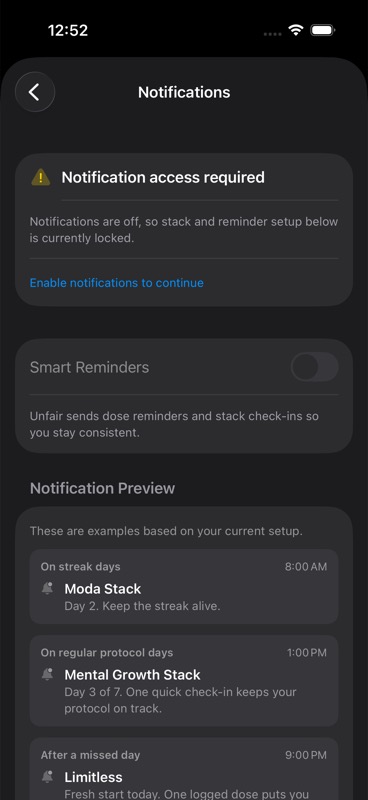
What has to be true before reminders can appear
Unfair only schedules stack reminders when all of these are true:
- iPhone notification permission for Unfair is allowed
- `Smart Reminders` is turned on in Settings
- you have at least one active stack in your plan
If notification access is denied, or if `Smart Reminders` is off, Unfair clears pending reminder notifications instead of keeping old ones around.
If you are still setting up your routine, start with your stack first. Reminders depend on that plan. If your stack is inactive, there is nothing for the reminder system to follow. Use Adjusting Doses and Cycles if you need to change the plan itself.
How Unfair decides which days get reminders
Unfair looks at the active stack's cycle and only schedules reminders for on-cycle days.
In practice, that means the reminder system uses:
- the stack's cycle start date
- the number of on days
- the number of off days
- the stack's saved dose times
If your stack is set to run only on certain weekdays, those selected weekdays decide reminder days instead of the simple on-days/off-days count.
Unfair builds reminders ahead of time over a short rolling window, then refreshes them as your setup changes.
How reminder times are chosen
The fire times come from the dose schedule saved on the active stack.
If your stack has more than one planned dose time, Unfair can schedule more than one reminder on an on-cycle day. If a planned time for today has already passed, Unfair skips that one and only schedules future reminders.
This is why reminder timing follows your stack plan more closely than a single global reminder preference.
What the reminder actually says
The notification title uses your stack name when Unfair can resolve it.
The body changes based on your current context:
- if you already have a streak going, the reminder leans on the streak message
- if you are starting over and the cycle is at day 1, the reminder uses a fresh-start message
- otherwise, the reminder references the current cycle day
In Settings, Unfair also shows preview cards based on your current setup so you can see the style of reminder copy before the next one arrives. Those examples can look a little different depending on your language and whether the reminder is for a regular stack day, a streak day, a restart day, or an active experiment.
What you can do from the reminder
Current reminder notifications can include these actions:
- `Log Now`
- `Snooze 30m`
- `Skip This Dose`
These are quick-response actions on the notification itself. They are covered in more detail in Quick Actions and Shortcuts.
What not to expect
A few reminder-related settings exist in saved state, including fields for smart timing, quiet hours, and reminder windows. Based on the current shipped scheduling logic, stack reminders are driven by the active stack's cycle and saved dose times first.
So for end users, the safe mental model is simple: if you want reminder timing to change, change the stack schedule or cycle that the reminders follow.
Do not assume every stored reminder preference changes notification fire time in the current app build.
If reminders are missing or seem wrong
Work through these checks in order:
- Confirm iPhone notifications for Unfair are allowed.
- Confirm `Smart Reminders` is enabled in Unfair Settings.
- Confirm you actually have an active stack.
- Confirm the stack is on an on-cycle day, or on one of its selected reminder weekdays.
- Confirm the planned dose time has not already passed.
If the setup looks correct and reminders still do not show up, continue with Troubleshooting.