
Local notifications in Unfair are reminder alerts scheduled on your iPhone, so they can appear without a cloud account or a live connection to Unfair at the moment they fire.
What local notifications are in Unfair
Unfair uses iOS local notifications for reminder delivery. In practice, that means the app asks iPhone to schedule reminder alerts on the device itself.
When reminders are working normally, the alert is delivered by iOS at the scheduled time. Unfair does not need to send a live push from a server for that reminder to appear.
This is why local notifications are mainly about consistency support: dose reminders, stack check-ins, and experiment-related reminders that match your current setup.
What Unfair sends notifications for
Today, the Notifications screen describes these as `Smart Reminders` and shows example reminders based on your setup.
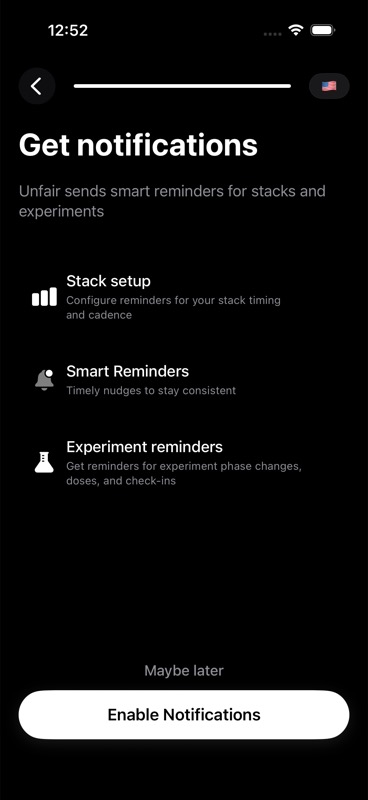
Those reminders can reflect things like:
- a regular protocol day
- a streak day
- getting back on track after a missed day
- an active experiment, if you are running one
The app also shows reminder actions you may see on delivered reminders:
- `Log Now`
- `Snooze 30m`
- `Skip This Dose`
If you want the setup view behind those reminders, start with Cycle-Aware Reminders. If you are trying to understand action buttons specifically, see Quick Actions.
What can block or change delivery
A reminder being scheduled is not the same thing as you seeing a loud, on-time alert. Local notifications still depend on iPhone settings.
Common blockers are:
- notifications for Unfair are not allowed
- you denied notification access earlier and have not re-enabled it in iPhone Settings
- a Focus mode, Scheduled Summary, or other iOS notification behavior changes how or when the alert is shown
- reminder scheduling is turned off inside Unfair because `Smart Reminders` is off
In the current app, when notification access is off, reminder setup in the Notifications screen is locked. If reminder access is denied, Unfair can send you to iPhone notification settings so you can change it there.
If Unfair is not authorized for notifications, or if `Smart Reminders` is off, the app removes pending reminder requests instead of leaving old reminder alerts in place.
What the notification preview means
The `Notification Preview` section in Settings is an example view, not a promise that every future reminder will use that exact wording forever.
In the current app, the preview is built from your setup and can include:
- your current stack names when available
- reminder times based on your saved dose schedule
- different contexts such as streak days, regular protocol days, missed-day recovery, and active experiments
The preview exists to help you understand the kind of reminder Unfair is preparing to show, plus the actions that come with it. It is not a separate notification stream and it does not mean extra alerts are being sent.
What happens when you tap a reminder action
Delivered reminder notifications can include quick follow-up actions.
- `Log Now` opens Unfair and takes you into dose logging.
- `Snooze 30m` creates a one-time reminder for 30 minutes later.
- `Skip This Dose` clears pending snoozes tied to that reminder.
These are reminder actions attached to a notification. They are different from app icon Quick Actions on your Home Screen. That distinction is explained in Quick Actions.
How reminders differ from marketing pushes
Unfair's notification settings explicitly say the app does not use notifications for marketing or sales.
In shipped behavior, notification categories and actions are set up around reminder handling. The Notifications screen is about consistency nudges tied to your stacks, doses, and experiments, not promotional campaigns.
So if you enable notifications in Unfair, you are enabling reminder delivery for your plan. You are not opting into a stream of marketing pushes.
If reminders are not showing up
Work through these checks in order:
- Open Unfair and go to the Notifications settings screen.
- Confirm `Smart Reminders` is turned on.
- If the screen says notification access is required, use the button there to enable access or open iPhone notification settings.
- Check whether your iPhone is using Focus or another notification setting that may silence or delay alerts.
- Review Cycle-Aware Reminders if you expected reminders for a stack or experiment and want to verify the scheduling conditions.
If reminder delivery is working but the wording looks different than you expected, check your in-app language in Supported Languages. The example wording can also differ depending on whether the reminder is for a regular stack day, a streak day, a restart day, or an active experiment.