
Unfair keeps your profile, logging history, and recommendation state on your iPhone so your daily use does not depend on a cloud account.
What is stored on your device
Unfair stores your profile answers, stack setup, reminders, dose logs, and journal timeline directly on your phone.
This keeps your day-to-day experience fast and available even when you are offline.
What this means for your privacy
Your core app data stays local by default.
Unfair does not require uploading your profile to use recommendations, logging, reminders, or journal review.
Optional data sharing
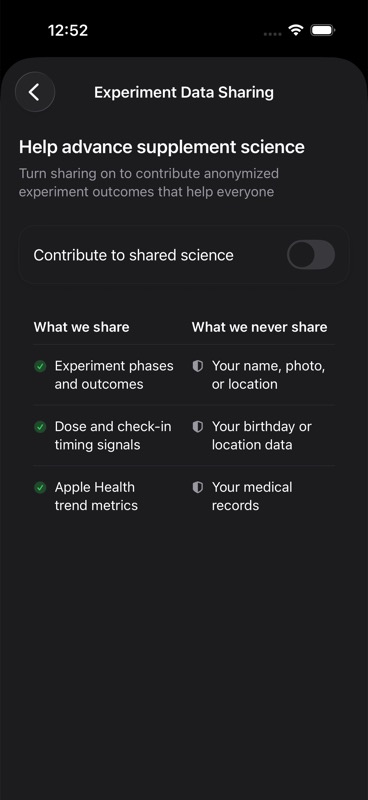
Experiment Data Sharing is optional and off by default.
If you turn it on, Unfair sends anonymized experiment snapshots for product and model quality improvements.
You can turn sharing off at any time in settings.
What to expect when changing devices
Because your core data is stored locally, moving to a new phone depends on your Apple backup and restore flow.
If you set up a new device without restoring a backup, your local Unfair history may not carry over automatically.
If you want to clear local data
You can remove app data by deleting Unfair from your device.
Before doing that, make sure you have any records you need.
If you are troubleshooting and want guidance first, use Troubleshooting.