
Unfair lets you line experiments up, see which one is expected to start next, pause or resume a running experiment, make an end-of-run decision when the decision window opens, and review finished or cancelled experiments later in history.
Where this lives in the app
You manage most of this from the `You` tab.
Depending on your current state, the experiment area can show:
- an active experiment card
- an `Up next` card when something is queued
- a queue sheet for reviewing queued items
- a `Finished experiments` shortcut to history
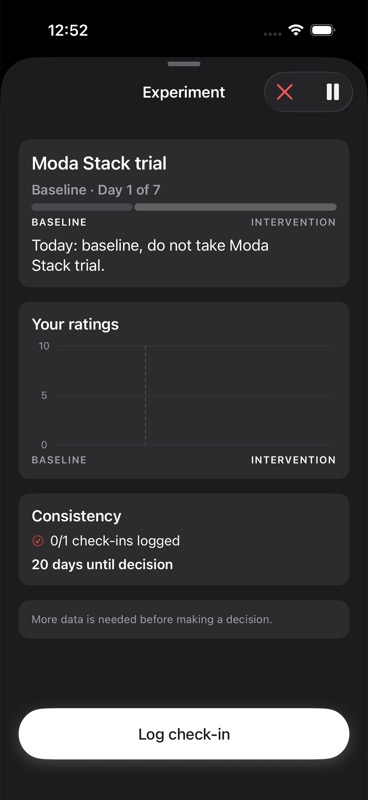
If you open an experiment, its detail screen is where pause, resume, cancel, and decision actions appear.
How the queue works
Unfair supports one active experiment at a time.
If you add a new experiment while another one is already running, the new one can be placed in the queue instead of starting immediately.
In the queue sheet, each queued experiment shows:
- its title
- its queue position
- an estimated start date when the app can calculate one
You can also:
- reorder queued experiments using edit mode
- remove an experiment from the queue
- start a queued experiment manually when no other experiment is active
If an experiment is already active, Unfair will not start another one at the same time.
What estimated start means
The `Estimated start` line is a planning aid, not a promise.
Unfair calculates the estimate from the current queue order and the planned length of the experiments ahead of it.
In practice, that means the estimate is based on:
- the remaining planned days in the currently active experiment, if one is running
- the full planned length of any queued experiments before yours
- the current queue order
If there is no active experiment, the first queued experiment is treated as the next one to start.
If you reorder the queue, remove something, cancel something, or change a queued experiment, the estimate can change.
How pause and resume affect timing
When you pause a running experiment, the experiment stays in place instead of finishing or moving itself to history.
Pausing matters in two ways:
- the experiment detail screen changes from `Pause` to `Resume`
- queue timing uses the paused experiment as the current blocker until you resume it or cancel it
In other words, a paused experiment still sits ahead of the queue.
Unfair does not treat pause as a finished decision. The next queued experiment does not move forward just because the current one is paused.
When you resume, the same experiment continues.
When the next queued experiment starts
There are two ways the next queued experiment can start:
- You start it manually from the queue when nothing else is active.
- Unfair can automatically start the first queued experiment once its estimated start day is due and there is no active experiment.
That auto-start behavior only applies to the first item in the queue, and only when the app sees that no experiment is currently active.
If you finish or cancel an experiment and another one is queued, the finished experiment screen can also show a `Start next` button with the next queued experiment’s title.
What happens during the decision window
Near the end of an experiment, Unfair moves from simply collecting data to helping you decide what to do next.
Before the decision is ready, the app may show status messages such as:
- `Collecting intervention data. Keep daily check-ins consistent.`
- `Early signal forming. Keep daily check-ins consistent.`
- `Improve protocol adherence before deciding.`
- `Decision is not ready yet.`
These messages mean the app is still waiting for enough usable experiment data, enough consistency, or both.
When the decision window is open and the experiment is eligible, the detail screen gives you a decision path instead of just a status message.
Your decision choices
When a decision is available, Unfair lets you add optional end notes and then choose one of these actions:
- `Keep & add to routine`
- `Kill`
- `One more cycle`
Here is what each one means in app behavior:
Keep & add to routine
Choose this when the experiment feels worth keeping.
In history, this decision is shown as `Kept`.
Kill
Choose this when you want to end the experiment and not keep it as part of your routine.
In history, this decision is shown as `Killed`.
One more cycle
Choose this when you are not ready to keep or kill it yet and want to continue running it longer.
In history, this decision is shown as `Extended`.
This is the app’s continue-running choice. It means the experiment was deliberately continued instead of being closed out as a keep or kill.
Decision notes
Before you choose `Keep`, `Kill`, or `One more cycle`, Unfair gives you a `Decision notes (optional)` field.
Use this for short end notes you want to remember later, such as:
- why you kept it
- what side effects mattered most
- what still felt uncertain
- why you chose one more cycle
If you save notes with a decision, those notes can appear later in both the experiment detail view and finished history.
Canceling is different from deciding
Canceling an experiment is not the same as making a keep, kill, or continue decision.
If you cancel, the app warns that it will stop the experiment and remove upcoming experiment reminders.
Canceled experiments can still appear in history, but they are treated differently from experiments you actively decided to keep or kill.
What you can review in history
The `Finished experiments` sheet is your review surface for completed and cancelled experiments.
If you have no finished experiments yet, the app says that completed and cancelled experiments will appear there later.
When history has items, it shows:
- the total number of finished experiments
- count badges for `kept`, `killed`, and `cancelled` when those counts exist
- one row for each finished experiment
Each experiment row can include:
- the experiment title
- a result label such as `Kept`, `Killed`, `Extended`, `Cancelled`, or `Completed`
- the date the experiment ended or was last updated into its finished state
- up to two short outcome delta highlights when those summaries are available
- your saved decision notes, if any
You can tap a finished experiment from history to reopen its detail screen and review the full report.
What history does not do
History is for review, not queue management.
You do not reorder the queue from history, and history does not replace the active experiment detail view for making current-day actions.
Think of the flow like this:
- queue is for what comes next
- experiment detail is for what is happening now
- history is for what already ended
Practical ways to use this well
A few habits make this part of Unfair more useful:
- Keep only the experiments you actually expect to run in the queue, so estimates stay realistic.
- If timing changes, reorder the queue instead of trying to remember a mental list.
- Pause only when you intend to come back, because a paused experiment still blocks what is next.
- Add a short decision note when you keep, kill, or continue, so history is more useful later.
- Review finished experiments in history before starting a similar experiment again.
For the broader home-screen context around these surfaces, see You Tab Overview. For terms related to adherence and day-to-day execution, see Adherence and Journal Timeline.