
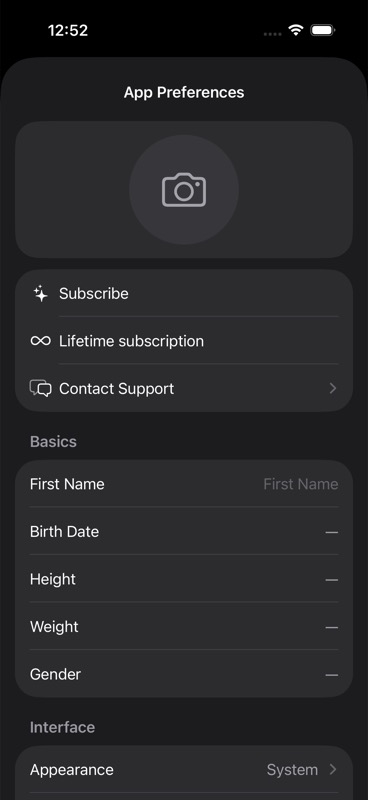
Subscription Tier is the app's current plan state for your account, usually Free or Pro, and it is best used as a billing and access signal rather than a perfect map of every feature the app will or will not let you open today.
What your tier means in practice
In the current app, `Free` and `Pro` are the main plan labels.
A helpful way to read them:
- `Free` means you are using Unfair without an active Pro purchase being recognized on that screen.
- `Pro` means the app is recognizing a paid Pro entitlement from Apple for the products it checks.
- If you bought a recurring plan, your tier is tied to your App Store subscription.
- If you bought lifetime, that is a separate purchase path from the regular monthly or yearly subscription flow.
If you want the broader product context, see Free and Pro and Pro Features.
Where to check your current plan
There are two places that matter most.
In Unfair's paywall screens
When the app recognizes an active subscription on the main Pro paywall, the paywall changes from a purchase screen to an active-state screen.
On that screen, Unfair can show:
- `Pro Active`
- `Current plan: ...`
- `Next renewal: ...` when Apple has a renewal or expiration date available
- `Manage Subscription`
That is the clearest in-app confirmation that the app currently sees an active Pro subscription.
In Apple's subscription management screen
Use `Manage Subscription` when you need the billing source of truth for a recurring plan.
That screen is where you can confirm:
- whether the subscription is active
- the renewal date Apple has on file
- whether the plan is set to renew
- cancellation or plan-change status
If you have a recurring subscription and need to know whether billing is active, Apple's screen is the more authoritative place to check.
What you should not conclude from the current paywall surfaces
The current paywall screens are useful, but they do not prove everything about feature enforcement across the app.
Here is the safe interpretation:
- If you see marketing language about full access, smarter recommendations, guidance, or insights, treat that as current paid-plan messaging.
- Do not assume that every feature in the app is already hard-locked strictly by tier.
- Do not assume that seeing a feature while on free means that feature is permanently part of the free plan.
- Do not assume that the absence of a lock on one screen means your billing state is wrong.
This matters because the product repo currently shows paywall and entitlement plumbing, but it does not clearly enforce every planned free-versus-Pro boundary across the entire product yet.
In plain language:
- the paywall can tell you whether Unfair currently recognizes a Pro purchase
- the paywall cannot, by itself, serve as a complete contract for every feature boundary in the app
What the onboarding paywall does and does not tell you
During onboarding, Unfair can show a Pro subscription screen after recommendations.
That screen lets you:
- subscribe
- restore purchases
- open `Manage Subscription`
- continue with `Continue without purchasing`
What that means in practice:
- onboarding is not currently purchase-required
- seeing the onboarding paywall does not mean your account is blocked until you pay
- continuing past that screen without purchasing does not by itself mean anything is wrong with your account
If your tier looks wrong
Start with the simplest explanation first: the app may not have refreshed your App Store entitlement yet, or you may be signed into a different Apple ID than the one used to buy Pro.
Work through these steps in order:
- Open the paywall or onboarding purchase screen and use `Restore Purchases` or `Restore purchase`.
- Tap `Manage Subscription` and confirm the subscription is active in Apple's screen.
- Make sure you are signed into the same Apple ID that made the purchase.
- If you bought lifetime, reopen the lifetime purchase screen from Settings and use its restore button there too.
- Close and reopen the app, then check the paywall again.
When the app says Pro is active but something still feels off
If the paywall shows `Pro Active` or a `Current plan` line, Unfair is recognizing a valid entitlement for that purchase flow.
If a feature still behaves the way you expect free access to behave, the safest conclusion is not immediately "my subscription failed." It may simply mean that feature is not yet strictly gated in the current version.
Check Pro Features for feature-specific guidance, and use Restore Purchases if the app is missing an entitlement it should already see.
When to contact support
Contact support if all of these are true:
- Apple shows the subscription as active, or you know you bought lifetime
- you already used the restore action
- the app still does not show the expected plan state
When you reach out, include:
- whether you bought monthly, yearly, or lifetime
- whether `Manage Subscription` shows the plan as active
- whether the app shows `Pro Active`, `Current plan`, or no active status at all
- which screen looks wrong
That makes it much easier to tell the difference between a billing-recognition problem and a feature-behavior question.