
Unfair Pro is the app's paid access tier, and the most reliable place to see what is included right now is the paywall or your in-app plan screen.
What Pro means today
Pro is how Unfair handles paid access. In the app, Pro is sold through Apple-managed purchase flows, and you may see monthly, yearly, or lifetime options depending on what is currently available for your account and region.
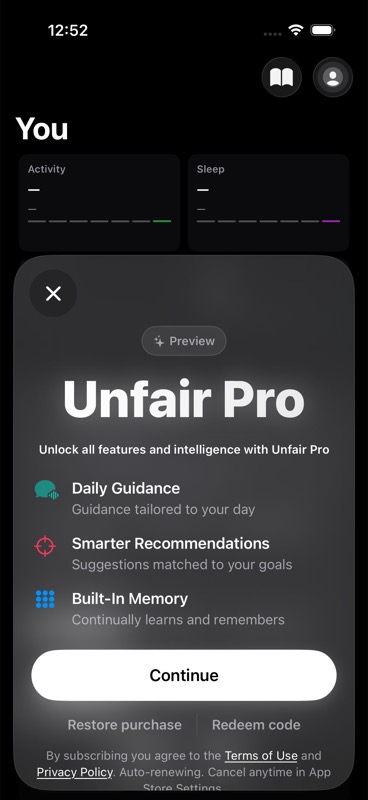
Because the product is still evolving, this page does not promise a permanent checklist of feature gates. Some screens describe Pro in broad terms such as daily guidance, smarter recommendations, or built-in memory, but the exact offer you can buy and the surfaces that mention Pro can change over time.
If you want the current answer, trust what the app shows you now:
- the onboarding paywall
- the main Pro paywall
- the lifetime paywall, if it is offered
- your plan or subscription screen in settings
For a general overview of how paid access fits into Unfair, see Free and Pro.
Where to check your current offer
To see the current Pro options on your device, open the in-app paywall or go to your plan screen. That is where you can confirm:
- whether Pro is active on your account
- which purchase options are currently being offered
- whether you have a subscription or lifetime access
- whether Apple shows a renewal date for an active subscription
If you already have Pro, the app may also show a `Manage Subscription` action that opens Apple's subscription management screen.
What not to assume
Do not treat older screenshots, blog posts, or third-party articles as the source of truth for Pro access. The app currently has billing and paywall surfaces, but not every Pro-related message in the product maps cleanly to one stable, permanently enforced feature matrix.
That means two things can both be true:
- Pro is the paid tier you use to unlock paid access in Unfair.
- The exact boundaries of that access may be refined as the app's gating becomes more consistent.
This page is intentionally conservative so you do not buy based on outdated promises.
If you want to buy Pro
Open the paywall in the app and review the options shown there. The app currently supports Apple-managed purchasing for available Pro products, and some users may also see a lifetime offer.
Before you confirm a purchase, check the paywall on your device for:
- the plan name
- the displayed price
- whether billing is recurring or one-time
- the legal links shown for terms and privacy
If you are still in onboarding, Unfair may also let you continue without purchasing and come back later.
If you already paid
Use the in-app plan or paywall surfaces to confirm your current status first.
If Pro does not appear to be active:
- Make sure you are signed into the same Apple account that made the purchase.
- Open the paywall or billing screen and use `Restore purchase` or `Restore Purchases`.
- If you have an active subscription, try `Manage Subscription` to verify what Apple shows for that account.
- If you redeemed an offer code, return to the paywall and confirm the purchase completed on the same account.
For step-by-step help, see Restore Purchases.
Lifetime access
Unfair can also show a lifetime purchase flow in some places. If that option appears for you, the app presents it as a one-time purchase for lifetime access to Pro.
The simplest rule is this: if you see a lifetime offer in the app, use the wording and price shown there as the current source of truth.
Need billing help?
Start with these help pages:
If the app and Apple's subscription screen disagree, trust Apple's billing status first and then return to Unfair and restore your purchase.